> ## Documentation Index
> Fetch the complete documentation index at: https://docs.quantbe.com/llms.txt
> Use this file to discover all available pages before exploring further.
# Crossover
> Tailor Your Success with Pattern function.
## Introduction
The Crossover function within Pattern Functions offers users the ability to analyze and capitalize on market trends by identifying key points of intersection between different datasets. This function provides users with customizable parameters to fine-tune their analysis and create actionable signals.
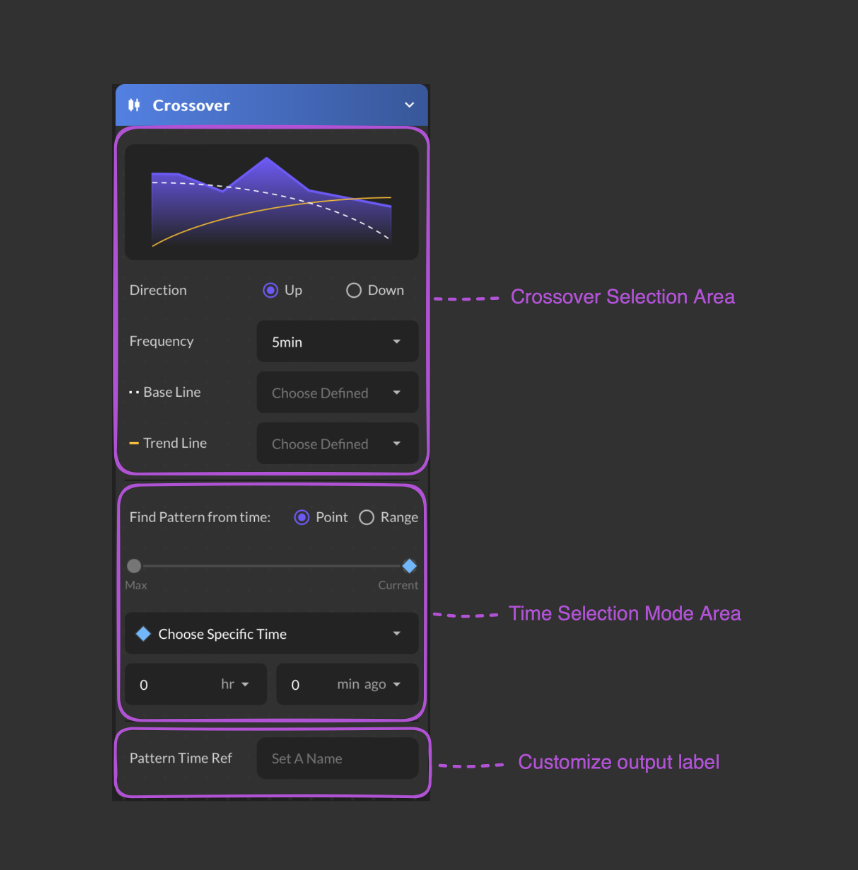 ### Input Parameter
Select a time frequency between Up and Down.
Select a time frequency from the available list.
Choose a predefined data as a base line.
Choose a predefined data as a trend line.
Select a time point or time range
* Choose Specific Time
* Choose Defined Time
* Start at Specific Time
* Start at Defined Time
### Input Parameter
Select a time frequency between Up and Down.
Select a time frequency from the available list.
Choose a predefined data as a base line.
Choose a predefined data as a trend line.
Select a time point or time range
* Choose Specific Time
* Choose Defined Time
* Start at Specific Time
* Start at Defined Time
* Backward Period
* Forward Period
* End at Defined Time
Select Hour and Minutes from the dropdown list. Max defaults is 250 days.
Users are required to provide a name for their data.