> ## Documentation Index
> Fetch the complete documentation index at: https://docs.quantbe.com/llms.txt
> Use this file to discover all available pages before exploring further.
# Find Candle Pattern
> Illuminate Market Signals: Candle Patterns Guide Your Moves.
## Find Candle Pattern
Candle Patterns are formed by one or multiple candlesticks, offering a visual representation of market sentiment. These patterns serve as powerful tools for identifying potential trend reversals or continuations.
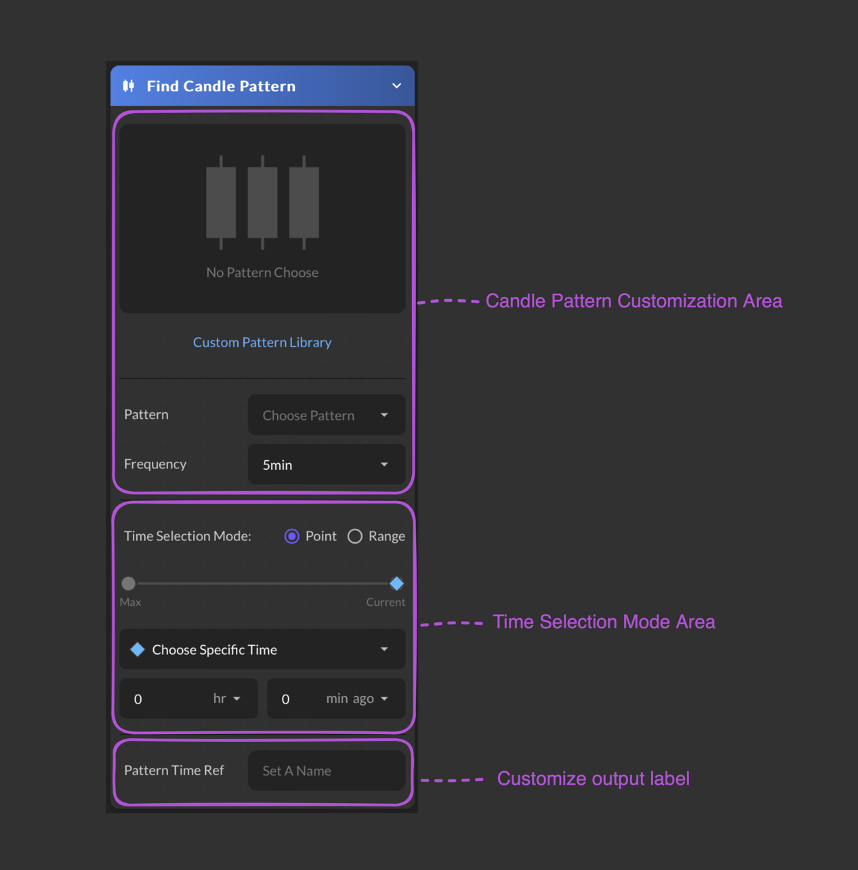 ### Input Parameter
Choose a candle pattern from available list.
Select a time frequency from the available list.
Select a time point or time range
* Choose Specific Time
* Choose Defined Time
* Start at Specific Time
* Start at Defined Time
### Input Parameter
Choose a candle pattern from available list.
Select a time frequency from the available list.
Select a time point or time range
* Choose Specific Time
* Choose Defined Time
* Start at Specific Time
* Start at Defined Time
* Backward Period
* Forward Period
* End at Defined Time
Select Hour and Minutes from the dropdown list. Max defaults is 250 days.
Users are required to provide a name for their data