> ## Documentation Index
> Fetch the complete documentation index at: https://docs.quantbe.com/llms.txt
> Use this file to discover all available pages before exploring further.
# Validation Mode
> Financial Excellence Through Strategic Brilliance.
### Introduction
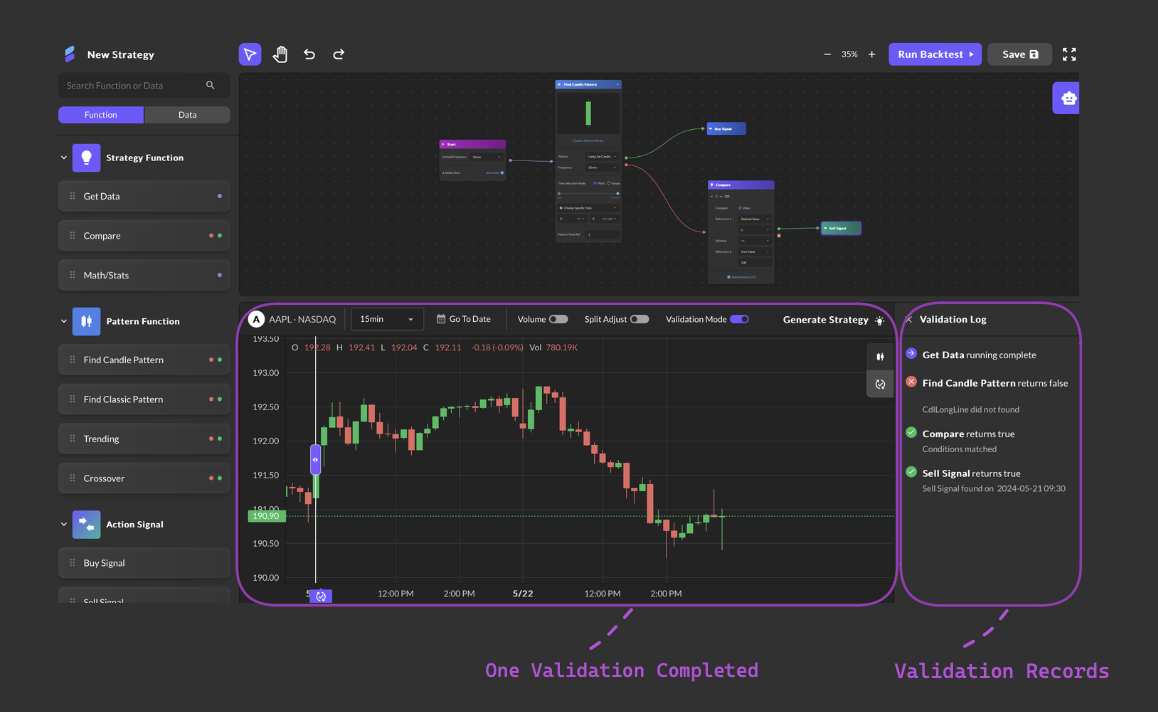
Validator is a feature designed to help users validate the execution status of each function within a pre-generated strategy at specific points on a stock chart. It provides valuable insights into how a strategy performs, which are conveniently displayed in the Validation Log section. This helps users optimize and refine their trading strategies.
 ## Usage Instructions:
1. **Activate Validation Mode**:
* Click the "Validation Mode" button. The selection bar will appear in the middle of the stock chart by default.
2. **Initiate Validation**:
* Drag the selection bar to the desired point on the stock chart and release it to start the validation process. A purple signal point icon will be generated and marked below the selection bar. The signal point tag will remain visible until a new one is generated after the next validation is completed.
3. **View Validation Log**:
* The Validation Log sidebar will appear on the right, showing the execution status of each strategy function:
* **Green checkmark**: True judgment
* **Red cross**: False judgment
* **Purple arrow**: Pass through
* **Yellow exclamation mark**: If any error occurs, an error message will show "Running failed".
4. **Interacting with the Log**: Clicking on a log entry highlights the corresponding strategy function.
5. **Navigating Long Strategies**:
* If the strategy is too long to fit on the screen, clicking a log entry will automatically scroll the section above the stock chart to the corresponding function mentioned in the log.
## Usage Instructions:
1. **Activate Validation Mode**:
* Click the "Validation Mode" button. The selection bar will appear in the middle of the stock chart by default.
2. **Initiate Validation**:
* Drag the selection bar to the desired point on the stock chart and release it to start the validation process. A purple signal point icon will be generated and marked below the selection bar. The signal point tag will remain visible until a new one is generated after the next validation is completed.
3. **View Validation Log**:
* The Validation Log sidebar will appear on the right, showing the execution status of each strategy function:
* **Green checkmark**: True judgment
* **Red cross**: False judgment
* **Purple arrow**: Pass through
* **Yellow exclamation mark**: If any error occurs, an error message will show "Running failed".
4. **Interacting with the Log**: Clicking on a log entry highlights the corresponding strategy function.
5. **Navigating Long Strategies**:
* If the strategy is too long to fit on the screen, clicking a log entry will automatically scroll the section above the stock chart to the corresponding function mentioned in the log.