> ## Documentation Index
> Fetch the complete documentation index at: https://docs.quantbe.com/llms.txt
> Use this file to discover all available pages before exploring further.
# BackTest
> Shaping Future Success Through Historical Insight
## Introduction
Back Testing serves as the cornerstone of confident evaluation in investment strategies. Simulate a chosen approach over historical markets by selecting a strategy, market, and stocks. The system seamlessly provides the minimum frequency required for the selected strategy. Define the preferred time frame and witness the past unfold in real-time, enabling refinement and optimization of the investment approach for future success. Back Testing empowers informed decisions, providing a clear understanding of how strategies would have performed in the past, helping shape a more resilient and profitable investment future.
 ## Simple Steps
Initiate a backtest by following these steps.
Begin by crafting one or more strategies through the "Create New Strategy" option. Define your unique approach to stock analysis and save it for future use.
To access the Backtest feature, you have two options. First, select your target strategy, then click "Run Backtest" located in the upper right corner. Alternatively, you can click "Create New Backtest" at the top of the Dashboard interface.
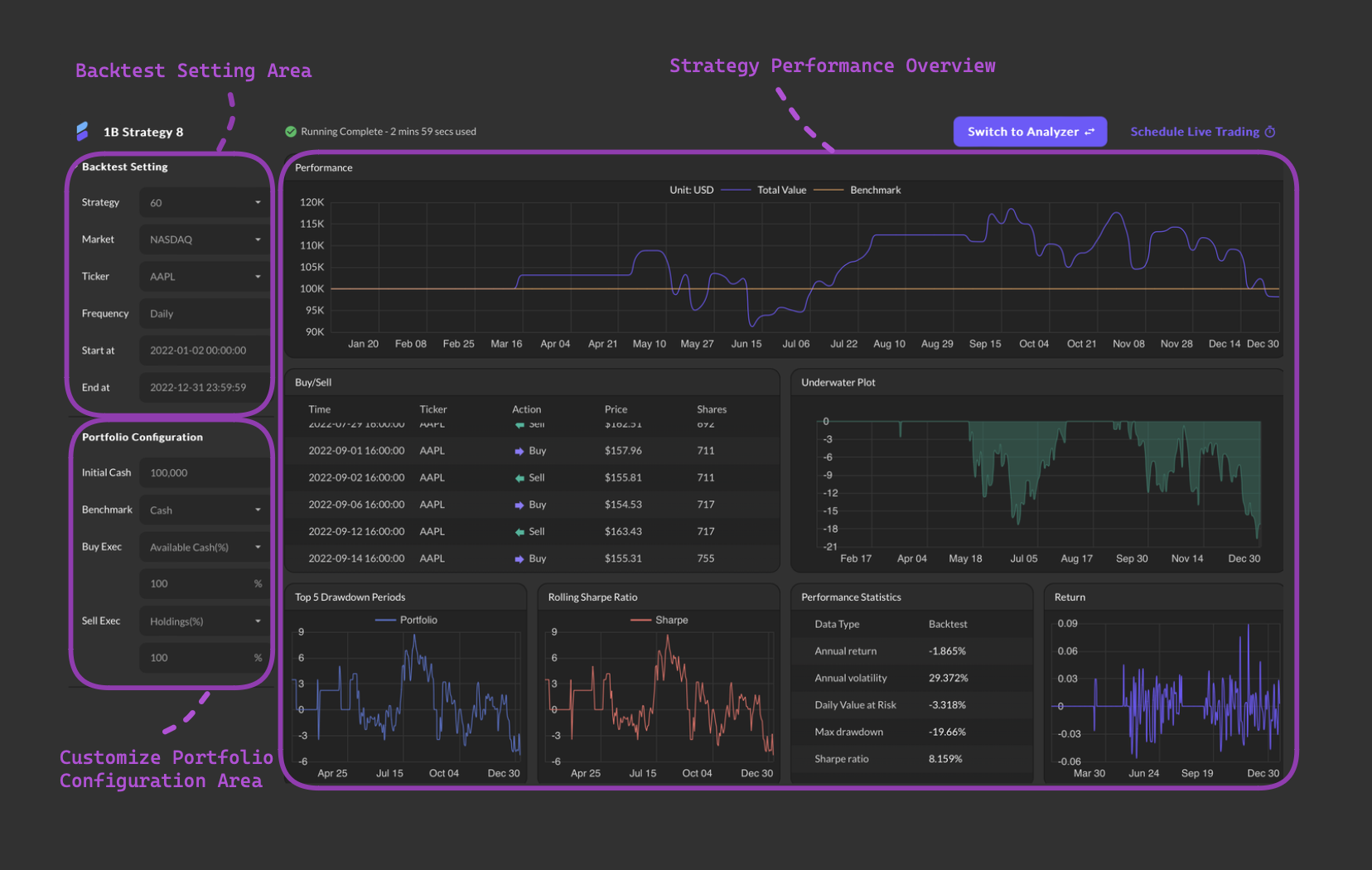
In the "Back Test" section, customize your analysis by specifying the market (e.g., NASDAQ), selecting stocks (e.g., AAPL, TSLA), and defining the historical data range.
Enhance your portfolio by entering an initial cash amount, selecting a benchmark (e.g., cash), and deciding on buy/sell execution options.
Hit the "Run Back Test" button to initiate the analysis. Watch as QuantBe processes your chosen strategy, providing valuable insights into its historical performance.
After completion, delve into the insightful analysis or plan to schedule a live trading session effortlessly. With Analyzer, gain deeper insights into your strategy's performance and refine your trading approach with confidence. Additionally, seamlessly transition from analysis to action by scheduling live trading sessions directly from the platform.
## Input Parameter
### Back Test Setting
Select a predefined strategy from the available list.
Select a stock market from the available list.
Select a ticker from the available list.
Get default frequency from strategy.
Select a start date and time from the calendar.
Select a end date and time from the calendar.
### Portfolio Configuration
Input an initial cash amount for this back test.
Select a benchmark.
Optimize your buying strategy effortlessly with Buy Exec.
1. **Available Cash(%):** Allocate a specified percentage of your available cash for each buying execution.
2. **Fixed Cash Amount:** Specify a precise fixed cash amount for individual buying transactions.
Optimize your selling strategy seamlessly with Sell Exec.
1. **Holdings(%):** Input the percentage of your portfolio holdings for each selling transaction.
2. **Fixed Cash Amount:** Specify a precise fixed cash amount for each selling transaction.
## Simple Steps
Initiate a backtest by following these steps.
Begin by crafting one or more strategies through the "Create New Strategy" option. Define your unique approach to stock analysis and save it for future use.
To access the Backtest feature, you have two options. First, select your target strategy, then click "Run Backtest" located in the upper right corner. Alternatively, you can click "Create New Backtest" at the top of the Dashboard interface.
In the "Back Test" section, customize your analysis by specifying the market (e.g., NASDAQ), selecting stocks (e.g., AAPL, TSLA), and defining the historical data range.
Enhance your portfolio by entering an initial cash amount, selecting a benchmark (e.g., cash), and deciding on buy/sell execution options.
Hit the "Run Back Test" button to initiate the analysis. Watch as QuantBe processes your chosen strategy, providing valuable insights into its historical performance.
After completion, delve into the insightful analysis or plan to schedule a live trading session effortlessly. With Analyzer, gain deeper insights into your strategy's performance and refine your trading approach with confidence. Additionally, seamlessly transition from analysis to action by scheduling live trading sessions directly from the platform.
## Input Parameter
### Back Test Setting
Select a predefined strategy from the available list.
Select a stock market from the available list.
Select a ticker from the available list.
Get default frequency from strategy.
Select a start date and time from the calendar.
Select a end date and time from the calendar.
### Portfolio Configuration
Input an initial cash amount for this back test.
Select a benchmark.
Optimize your buying strategy effortlessly with Buy Exec.
1. **Available Cash(%):** Allocate a specified percentage of your available cash for each buying execution.
2. **Fixed Cash Amount:** Specify a precise fixed cash amount for individual buying transactions.
Optimize your selling strategy seamlessly with Sell Exec.
1. **Holdings(%):** Input the percentage of your portfolio holdings for each selling transaction.
2. **Fixed Cash Amount:** Specify a precise fixed cash amount for each selling transaction.