

Introduction
Validator is a feature designed to help users validate the execution status of each function within a pre-generated strategy at specific points on a stock chart. It provides valuable insights into how a strategy performs, which are conveniently displayed in the Validation Log section. This helps users optimize and refine their trading strategies.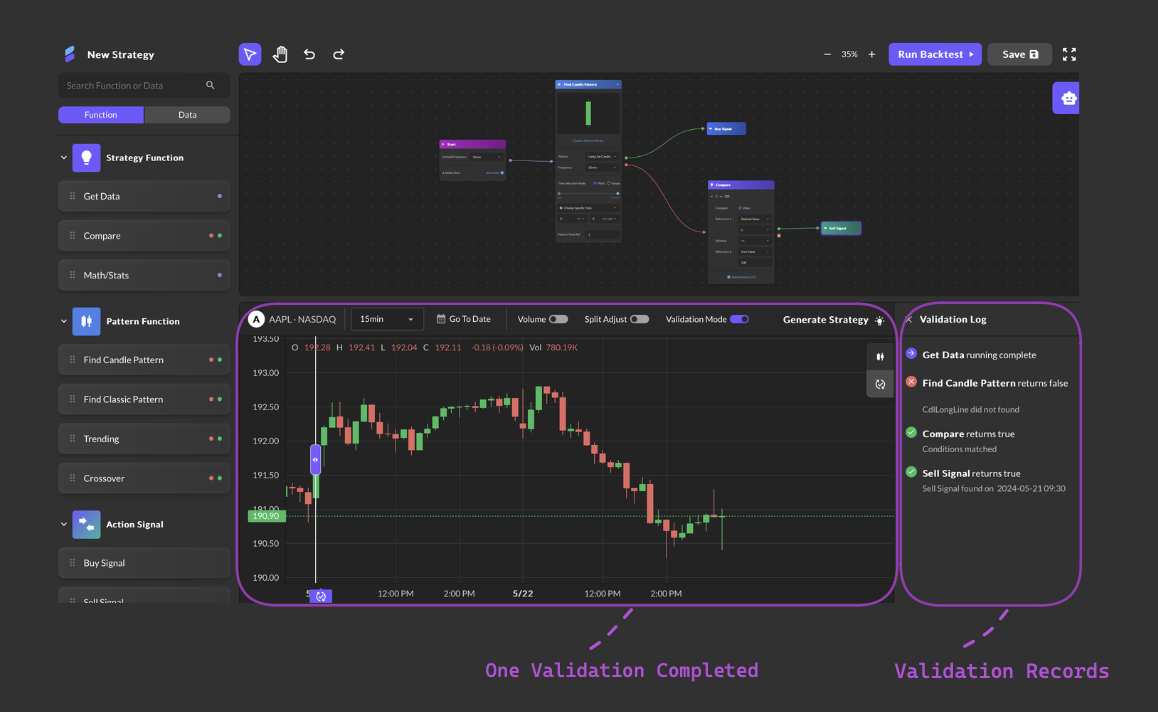
Usage Instructions:
- Activate Validation Mode:
- Click the “Validation Mode” button. The selection bar will appear in the middle of the stock chart by default.
- Initiate Validation:
- Drag the selection bar to the desired point on the stock chart and release it to start the validation process. A purple signal point icon will be generated and marked below the selection bar. The signal point tag will remain visible until a new one is generated after the next validation is completed.
- View Validation Log:
- The Validation Log sidebar will appear on the right, showing the execution status of each strategy function:
- Green checkmark: True judgment
- Red cross: False judgment
- Purple arrow: Pass through
- Yellow exclamation mark: If any error occurs, an error message will show “Running failed”.
- The Validation Log sidebar will appear on the right, showing the execution status of each strategy function:
- Interacting with the Log: Clicking on a log entry highlights the corresponding strategy function.
- Navigating Long Strategies:
- If the strategy is too long to fit on the screen, clicking a log entry will automatically scroll the section above the stock chart to the corresponding function mentioned in the log.