

Introduction
Analyzer is an extension of the BackTest functionality, designed for in-depth analysis and validation based on BackTest results. It helps users understand if the specified rules within the strategy were executed correctly and reveals the operational logic behind buy and sell signals.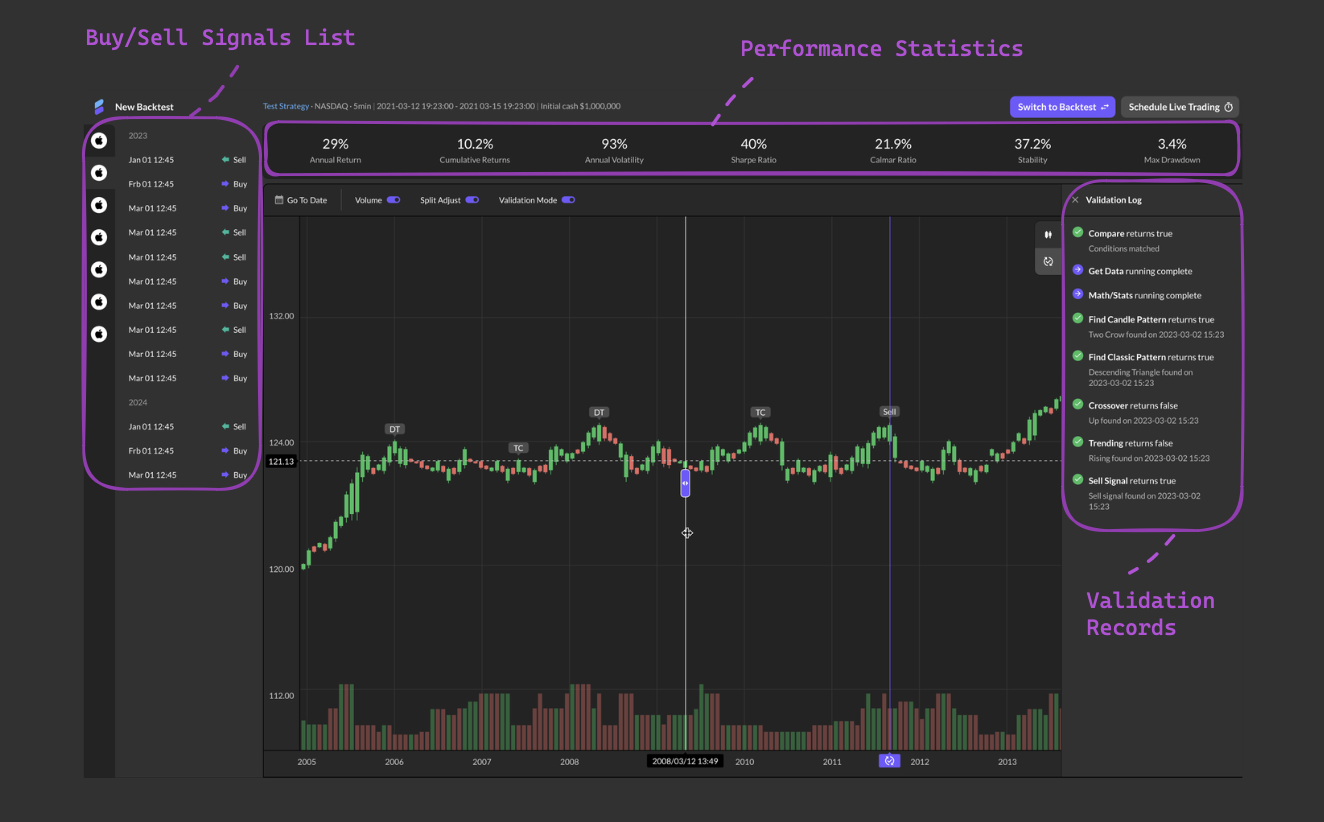
Usage Instructions:
- Initiate Analyzer: Upon completing a BackTest, navigate to the top right corner of the page and click on “Switch to Analyzer” to start the Analyzer feature.
- BackTest Tickers and Thumbnails: All BackTest tickers and their thumbnails are displayed on the left side of the Analyzer page.
- Viewing Signals: Clicking on the stock trend thumbnail of a ticker shows all the buy and sell signal interfaces generated by that ticker. Hovering over a ticker icon displays the corresponding thumbnail
- Back to Strategy: Clicking on the strategy name at the top bar helps users return to the corresponding strategy.
-
Validation Mode:
- Click on a buy or sell signal on the left to activate Validation Mode. All buy and sell markers on stock charts will be hidden.
- A selection bar will automatically appear on the candle bar with the corresponding buy or sell signal, centered for optimal visibility.
- All buy and sell signal tags will display on the stock chart, except for the selected signal on the left. Users can drag the selection bar to another buy or sell signal point and release it to perform validation.
- If the validation results in a Sell signal at the location of the selection bar, the corresponding Sell signal on the left will be highlighted. The signal point will be marked by a purple icon beneath the selection bar on the timeline.
- Clicking on a log entry in the Validation Log will highlight the corresponding pattern tag on the stock chart.
- After completing validation, dragging the stock chart left or right will not move the selection bar horizontally; it will follow the movement of the candle bar that was marked during validation.
- Validation Log: The validation log on the right side displays different statuses for each function in the strategy, such as True (green checkmark), False (red cross), Pass through (purple arrow), and Running Failed (yellow exclamation mark). This log clearly shows why each buy/sell signal was generated at that point and provides immediate feedback if any errors occur, such as displaying “Running failed” for errors.